Integrations
Last revised September 2026
What WP FloorMap connects to: the property management systems behind the data, the editors your team already uses and the analytics that measure it all. One rule governs the first list.
The rule
How it connects
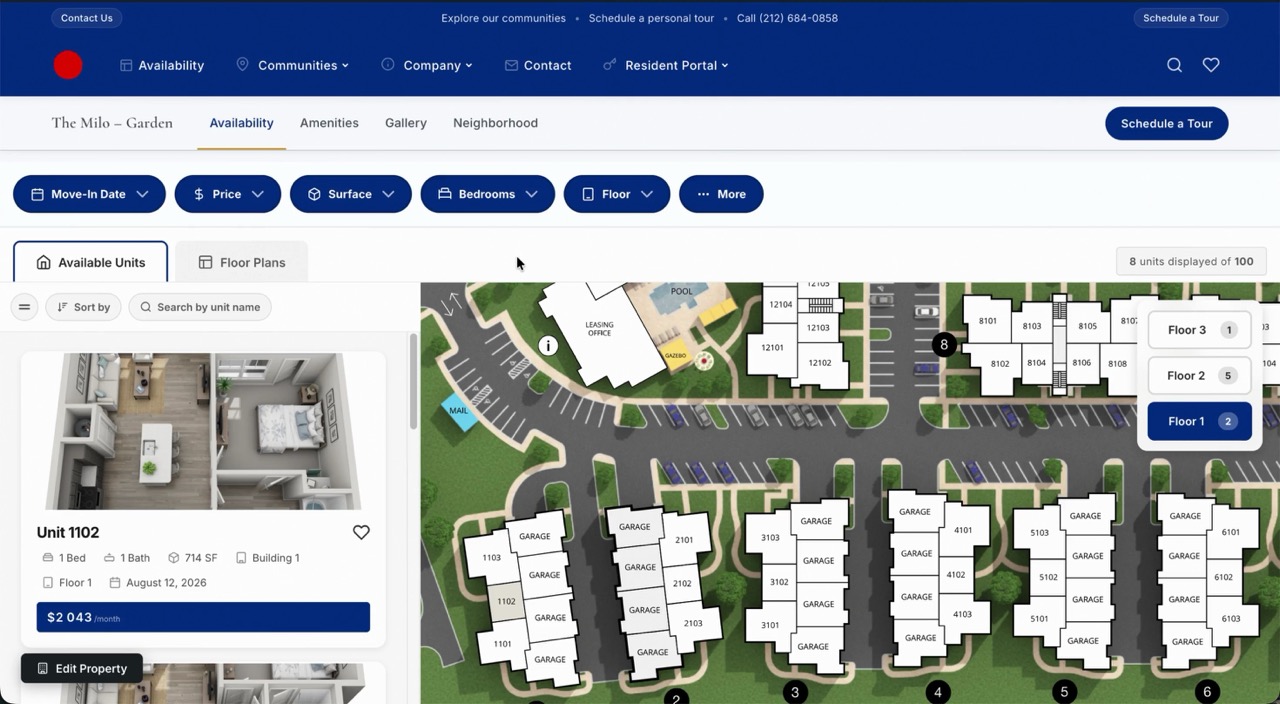
Simple rule: if Engrain supports your PMS, so do we. Every WP FloorMap site runs on your active Engrain SightMap subscription, so your unit availability, pricing and floor plan data flows from your property management system through Engrain to your website automatically and updates in real time. No manual entry, never out of date.
Engrain integrates with all the major property management and leasing systems, including Yardi, RealPage, Entrata, AppFolio, MRI, ResMan, Rent Manager, Quext and Storable, among others. And as Engrain adds new integrations, your WP FloorMap site picks them up too. Not sure whether your PMS is covered? Get in touch and we’ll confirm.
No PMS required, either. Commercial properties in particular run directly on Engrain’s own dashboard: you manage units and pricing there, and WP FloorMap’s built-in application flow carries a prospect from inquiry to application without a PMS behind it.
Beyond the property data, the site connects outward:
The editors
Page builders
Yes. On the Plugin plan, WP FloorMap drops into whatever editor you already build with: Elementor, Avada, Divi, WPBakery, Beaver Builder or the classic WordPress editor. A simple visual builder lets you place WP FloorMap’s elements (live floor plans, availability, search, tour scheduling, and inline snippets of live PMS data) anywhere on any page, no matter how your site is put together.
On the Launch and Studio plans, the complete site Foreword builds for you uses WordPress’s own built-in editor rather than a third-party page builder you have to license. That keeps your site easy to edit, built from reusable sections, and free of lock-in: it improves automatically as WordPress itself does, and it stays yours to change for good.
The measurement
Analytics and scripts
Your Engrain SightMap subscription includes a standard embed: an iframe you can paste into almost any web page, including a WordPress page. That puts the interactive map on the page, but it lives in a sealed frame: search engines and AI assistants can’t read the units inside it as part of your site, its interactions are measured in Engrain’s own analytics rather than alongside the rest of your visitor journey, and it can’t drive tour bookings or lead capture around it. WP FloorMap embeds SightMap natively and surrounds it with server-rendered unit cards, filters, pricing and structured data that Google and AI assistants can actually read. See it live at agency.wpfloormap.com, or read our full guide to embedding SightMap on your website.
Yes, and far better than an embedded widget can. WP FloorMap renders your floor plans, availability, filters and tour booking as real content on your own domain, not inside an iframe sealed off from your analytics. That means tools like Google Analytics and Microsoft Clarity see everything: WP FloorMap automatically sends Google Analytics events for map interactions, unit views, filter use and tour bookings, and Clarity’s session replays and heatmaps cover the entire property page, including the interactive parts. For a multifamily marketer that’s the difference between guessing and knowing: you can see exactly which units and floor plans prospects explore and where they drop off before booking a tour. And because it’s your own WordPress site, the data is yours, in your own analytics accounts.
Chat widgets, pixels and tags load through the built-in script manager, so a visitor’s consent decision applies to every script automatically.
A consent manager with GA Consent Mode and custom triggers turns your own scripts into a compliant cookie experience.
Something this page does not cover?
Write to us. A person in New York or Paris replies within one business day.
 Email Email |
info@foreword.dev | every plan |
|---|---|---|
 WhatsApp and SMS WhatsApp and SMS |
your Foreword contact | Launch and Studio |
 Dedicated Slack Dedicated Slack |
a private channel with your team | Launch and Studio |
 Phone Phone |
priority response | Studio |