

 by Graham Dyer
For years, an apartment marketing site could get away with a cookie banner copied from a competitor, a ‘starting at’ rent that quietly left out mandatory fees and an accessibility statement nobody had tested. 2025 and 2026 ended that. Regulators and courts gave all three of those areas real teeth: a multi-million-dollar federal settlement over hidden rental fees, new cookie-consent rules that took effect on January 1, 2026 and a record year for website-accessibility lawsuits.
This is a plain-English field guide to the three compliance fronts every multifamily marketing site now faces: cookies and consent, all-in pricing and accessibility. For each one, we’ll cover what’s actually being asked of apartment sites, the myths that get operators in trouble and how a well-built site helps you meet the bar.
One note before we start: this is educational, not legal advice. Compliance law varies by state and is changing fast. The specifics below are current as of September 2026, but you should confirm the requirements for your own markets with your counsel.
Interactive compliance check
In which state is your multifamily property?
Pick your state (and your city, where local rules differ) to see the three compliance fronts that apply to your apartment website as of September 2026.
Choose a state to see its cookie, all-in-pricing and accessibility profile.
Educational only and current as of September 2026; laws change and apply differently to every business, so confirm specifics with your own counsel. WP FloorMap builds sites engineered to clear all three of these bars out of the box.
1. Cookies & consent: the opt-out era
The single biggest misconception in U.S. multifamily marketing is that cookie compliance means a European-style ‘block everything until the visitor clicks Accept.’ That’s a GDPR concept, and as a Franco-American group with offices in New York and Paris, we know one when we see it. For a U.S.-only apartment site, most state privacy laws are opt-out, not opt-in: visitors are entitled to decline tracking and to tell you not to sell or share their data. You don’t generally have to block analytics until they consent.
What’s changed is how seriously that opt-out is enforced. Roughly nineteen to twenty states now have comprehensive consumer-privacy laws in effect (the exact count depends on how you treat Florida’s narrower law and a couple of statutes phasing in through 2026). A growing group of them (around a dozen, including California, Colorado, Connecticut, Texas and Oregon) require websites to honor the Global Privacy Control (GPC), a signal the visitor’s browser sends automatically. And California’s updated rules, effective January 1, 2026, are explicit: the ‘accept’ and ‘decline’ choices must be equally easy, simply closing the banner is not consent and a visitor who opts out should be able to see that their choice was honored.
The practical traps for apartment sites are mundane but expensive. An embedded map, a video, a chat widget or an ad pixel can drop tracking cookies the instant the page loads, before anyone has chosen anything, which counts as ‘sharing’ under several state laws. Enforcement is no longer theoretical: 2025 saw a string of six- and seven-figure penalties against companies whose banners looked fine but whose tracking fired regardless.
How a WP FloorMap site helps
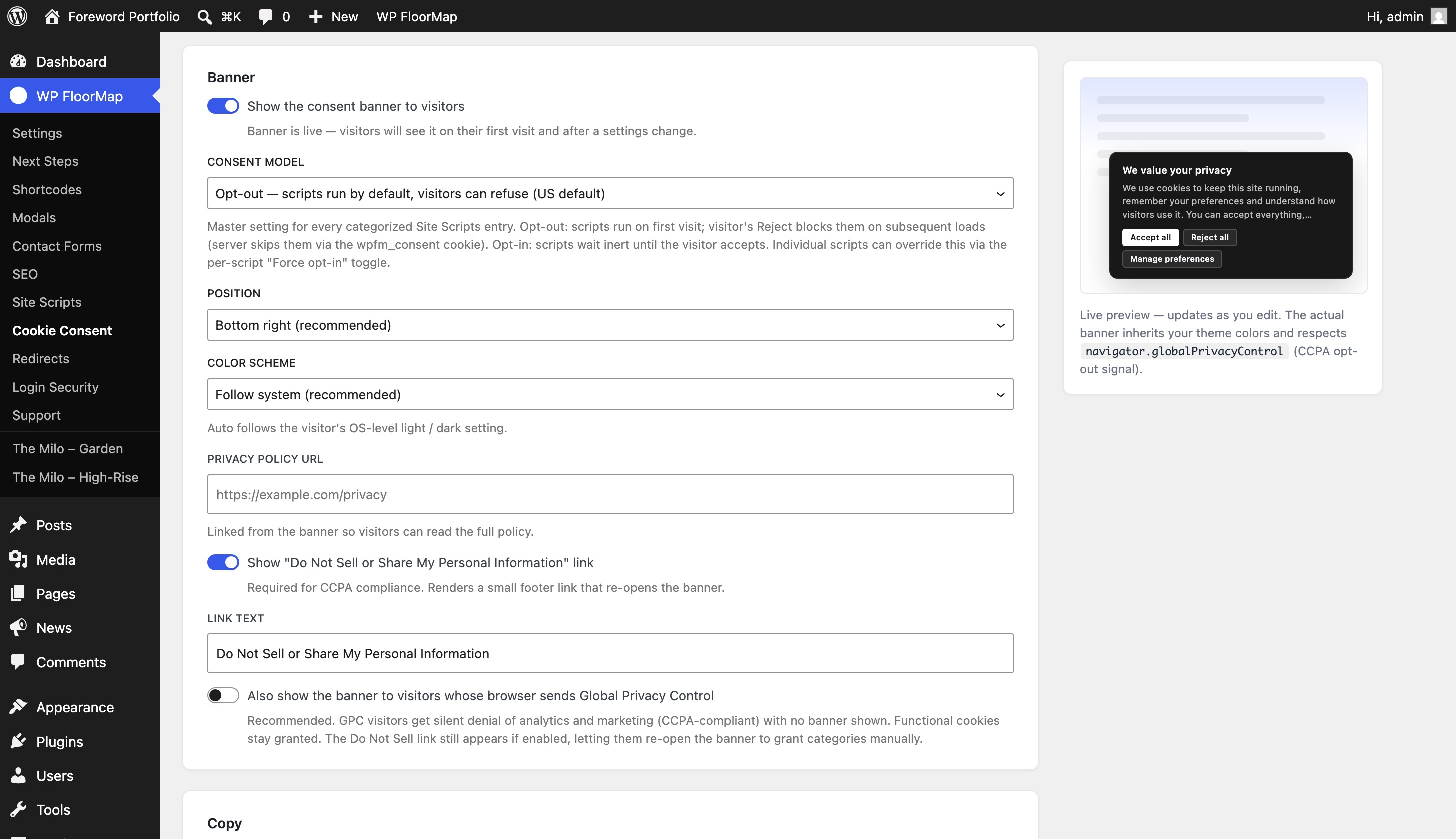
On sites built in the Launch or Studio tiers, you can switch on a consent manager built for exactly this landscape:
- A four-category consent banner (Essential, Functional, Analytics, Marketing) wired into Google Consent Mode v2, so Google’s analytics and ads tags respect the visitor’s choice instead of firing blind.
- Auto-detection of the analytics you already run. WP FloorMap recognizes a variety of common analytics and tag scripts (Google Analytics and Tag Manager, Microsoft Clarity, Meta Pixel and the like) as you add them to the site, and on request it will route each one through its own native consent mode, so the script itself withholds or anonymizes data until the visitor agrees rather than relying on the banner alone to hold it back.
- Global Privacy Control honored automatically. When a visitor’s browser sends the GPC signal, Analytics and Marketing scripts are denied for that visit, on the server and in the browser, without anyone touching the banner. That automatic honoring is precisely what the 2026 rules and the recent enforcement sweep are about, and it’s the part a banner alone doesn’t do.
- A ‘Do Not Sell or Share My Personal Information’ link you can drop into the footer, and a self-maintaining cookie-disclosure table that lists the first-party cookies your site actually sets alongside any analytics or marketing scripts you’ve enabled, so your privacy page stays accurate to what the site really loads.
- A privacy policy that maintains itself. WP FloorMap generates your privacy policy and cookie disclosures for you, and keeps them current as the site changes: add an external script or service through its consent-aware Site Scripts builder and the disclosures (and the consent gating that decides whether that script may load for a given visitor) update to match.
Because that Site Scripts builder is consent-aware, the banner doesn’t just display; it actually controls which scripts run for each visitor, and the generated privacy policy stays in step. The one thing software can’t do is decide which laws apply to your particular business, so it’s still worth having your counsel review the final policy.
2. All-in pricing: show the real number
There is, as of September 2026, no single federal rule forcing apartments to advertise an all-in price. The FTC’s 2025 junk-fee rule applies to live-event tickets and short-term lodging, not long-term leases, and a broader inquiry into rental-housing fees is still at the early-comment stage. But ‘no federal rule’ is very different from ‘no risk.’
In December 2025, the FTC and the State of Colorado announced a roughly $24 million settlement with one of the country’s largest apartment operators over advertising rents that left out mandatory fees, brought under existing deceptive-practices law, with no special junk-fee rule required. And states are writing all-in mandates directly into housing law:
- Colorado (HB25-1090), enacted in 2025 and effective January 1, 2026, requires advertised rent to include mandatory recurring fees, with penalties for hidden charges.
- Minnesota requires non-optional fees to be disclosed in any advertisement and a combined ‘Total Monthly Payment’ on the lease, with stiff damages for getting it wrong.
- Massachusetts, as of late 2025, requires a ‘total price’ inclusive of mandatory fees and bars collecting a prospect’s personal information before that price is shown.
- Connecticut’s broad price-transparency law extends all-in pricing to rental advertising: the total price, inclusive of mandatory fees, must appear at least as prominently as any other amount, with carve-outs for genuinely optional add-ons disclosed up front.
- Nevada (AB 121) goes further still: the single ‘maximum total periodic rent,’ fees included, must appear everywhere the rent is listed: not just the lease, but ILS listings, Zillow, Craigslist and social ads too.
And this is no longer a fringe trend: more than a dozen states plus Washington, D.C. have enacted some form of rental fee-transparency requirement, with more introduced every legislative session. The handful above are simply the ones that go furthest: requiring the advertised price itself to be all-in.
California is the contested case: its 2024 price-transparency law bars advertising a price that excludes mandatory fees, but industry groups have argued it doesn’t reach long-term residential leases, and that question isn’t settled. The takeaway for a multi-state operator is simple: showing the all-in number is the conservative path that satisfies the strictest current laws at once, and it’s also what renters want.
How a WP FloorMap site helps, and where Engrain fits
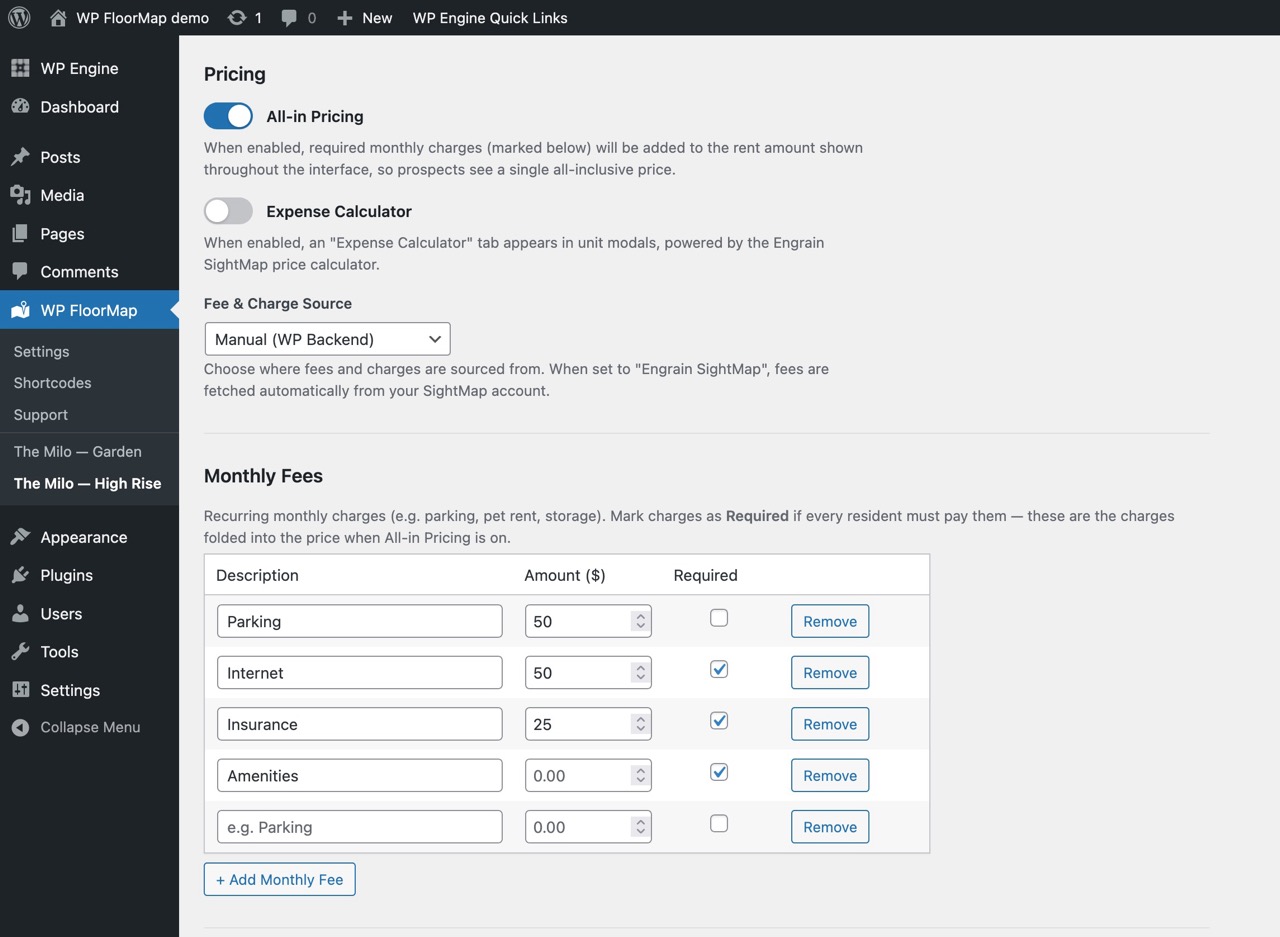
WP FloorMap renders fees transparently next to each unit and floor plan, from one of two sources you choose per property:
- Manual mode: you enter fees in WordPress, with no external dependency.
- Engrain SightMap® mode: fees pull live from your SightMap expenses data, normalized across monthly, one-time and annual charges, with unit-level overrides and a disclaimer carried through from the source.
This is worth underlining for anyone already on Engrain, because Engrain has done the hard part well. Getting fee transparency right is genuinely difficult, and they have leaned all the way into it. In a recent announcement, Engrain set out to be the new standard for multifamily fee transparency, pairing an advanced fee calculator with source-agnostic fee-data integrations and expanded API tooling. As CEO Brent Steiner put it, ‘operators need solutions, not promises.’ The calculator drops into any apartment site and is built for the messy reality of real pricing: unit-, floor-plan- and property-level fees, percentage-based fees, caps and limits, stepped and tiered logic, proration settings and expense-level disclaimers, all aimed at state and federal requirements without manual workarounds. Prospects can even add the optional fees that actually apply to them and see what they will truly pay each month, not just a headline rent.
What makes that so useful is the model underneath it: a single, authoritative source for all-in pricing, so the rent and required fees stay consistent everywhere they appear, from your own website to the listing sites and partner channels. WP FloorMap is one of those channels. It renders that same fee data straight from your SightMap source of record, so the all-in number on your marketing page matches the number in your system and updates when it does. If your fees are tracked manually instead, the site still shows them. Either way, the real number is on the page, not buried in fine print.
The honest caveat: the tool’s job is to display fees accurately. Deciding which fees are mandatory versus optional, and confirming that your advertising meets the all-in rules in each of your markets, is a judgment call for you and your counsel. The reliable ‘mandatory fee’ classification flows through in SightMap mode, and manual entries are shown exactly as you record them.
3. Accessibility: the highest-stakes pillar, and the overlay trap
Accessibility is where the legal exposure is largest and the shortcuts are most dangerous. Under the Americans with Disabilities Act, courts have repeatedly treated the website of a business with a physical location (and an apartment community has a leasing office) as an extension of that place, subject to Title III. There is no government-issued web standard for private businesses, but WCAG 2.1 AA has become the de facto benchmark that courts and plaintiffs measure against. For housing specifically, the Fair Housing Act adds a second theory: an inaccessible leasing site can be argued to deny equal access to housing information.
And the litigation is real and rising. 2025 set a record with roughly 3,100 federal website-accessibility lawsuits, up sharply year over year, with multifamily squarely among the targets and hotspots in New York, Florida and Illinois.
Here is the most important thing in this entire guide, because it’s where well-meaning operators spend money and increase their risk: automated accessibility ‘overlay’ widgets do not make your site compliant. In 2025 the FTC fined the overlay vendor accessiBe $1 million over claims that its AI tool could make any website WCAG-compliant. A large share of accessibility lawsuits that year targeted sites that had an overlay installed. Overlays sit on top of a broken page; they don’t fix how the page is built, and a screen-reader user can tell within seconds. Real accessibility is structural: semantic HTML, real readable text instead of content trapped in an opaque embed, labeled forms, keyboard operability and sufficient contrast, all engineered into the page rather than bolted on afterward.
How a WP FloorMap site helps
This is where WP FloorMap is at its strongest. Rather than bolt an overlay on after the fact, we engineer accessibility into the product, so every WP FloorMap site ships WCAG 2.1 AA accessible out of the box:
- Every block is accessible from day one. All ~50 WP FloorMap blocks and patterns are built to WCAG 2.1 AA wherever you place them, with explicit screen-reader handling, proper roles and labels, and complete keyboard operability. Every block, the navigation and every interface is 100% tabbable, so a keyboard or screen-reader user can do everything a mouse user can.
- Your floor plans and units are real, readable content, rendered as semantic HTML and Schema.org structured data (an
ApartmentComplexwith nestedAccommodationentities: beds, baths, square footage, amenities), not trapped in an unreadable widget, so screen readers and search engines can both read your inventory. - Guardrails on the content you add. For your own text and images (the parts outside our already-accessible blocks), WP FloorMap runs live color-contrast and alt-text checks as you edit, so your team can’t accidentally publish low-contrast text or an image with no alternative text.
That’s the difference between accessibility that’s engineered in and an overlay bolted on: a screen-reader user can tell within seconds which one they’re on. (As ever, none of this is legal advice: accessibility law is fact-specific and still evolving. But starting from a site that’s WCAG 2.1 AA from the first block, with guardrails on everything you add, is the strongest position there is.)
The short version
- Cookies: U.S. is opt-out, not opt-in: honor the Global Privacy Control signal, make decline as easy as accept and keep your disclosures accurate to what actually loads.
- Pricing: show the all-in number, fees included: it’s the conservative path under the strictest 2026 laws, and it’s what renters expect.
- Accessibility: build it in, don’t bolt it on: every WP FloorMap block ships WCAG 2.1 AA, with contrast and alt-text checks on whatever you add.
A site built on semantic markup, with consent and fee plumbing already in place, gives you a real head start on all three. But it’s a head start, not a finish line. Confirm the specifics for your markets with your own counsel, and treat compliance as something you maintain, not something you install once.
That’s exactly why we built WP FloorMap the way we did: every site is engineered to ship with none of the compliance problems above baked in (consent-aware analytics, all-in pricing tied to your real fee data and WCAG 2.1 AA accessibility in every block), and it keeps handing you the tools to stay clear of them as you modify the site, add properties and evolve as a developer. The guardrails travel with the product, not just the launch.
Ready to see the difference?
Send us your property and we’ll show you WP FloorMap on your own data: a real preview site, inside one business day.